Windows 변조 의심 dll 파일 삭제
고객사 서버 침해사고 발생하여 점검 진행
OS: Windows 2008 std 32bit
OS 버전이 낮아, 추가적인 프로그램 설치가 힘든 상황
백신 전체 점검 돌려도 감지 X
autoruns와 process explorer로 확인 중, 비정상 동작 감지 및 변조 의심 dll파일 확인
경로: c:\windows\system32\
파일명: winsycn.dll, WinSycn.db
변조 추정 근거:
- winsync.dll과 유사한 이름
- 생성일이 초기 침입 시점과 동일
- 변조일이 침임 시접과 동일
- Microsoft 서명 X
해당 파일 숨김파일 보기 조치해도 GUI 상에서 보이지 않음(cli 상에서 강제 명령어 주어야 조회됨)
해당 파일과 관련된 프로세스 중지 및 레지스트리 제거.
해당 조치 후에도 해당 파일 액세스 권한 부족으로 삭제되지 않는 것 확인.
조치:
1. dir "C:\Windows\System32\winsycn.dll" -Force #파일 확인
2. attrib -r -h -s "C:\Windows\System32\winsycn.dll" #읽기, 숨김, 시스템 속성 제거
3. Get-ExecutionPolicy #현재 적용되어있는 실행 정책 확인(Restricted)
4. Set-ExecutionPolicy RemoteSigned -Scope Process #실행 정책 변경
5. powershell script 작성(목적: 해당 dll 파일을 사용하는 process 및 pid 확인)
Get-Process | ForEach-Object {
    $process = $_
    try {
        $process.Modules | Where-Object { $_.FileName -like "*winsycn.dll*" } | ForEach-Object {
            Write-Output "Process: $($process.ProcessName) | PID: $($process.Id) is using $($_.FileName)"
        }
    } catch {
    }
}
6. powershell 스크립트 실행
- 실행 결과: Process: svchost | PID: 1664 is using c:\windows\system32\winsycn.dll
svchost.exe가 사용중이었고, diagsvc 라는 이름으로 1664 PID를 갖고 있음.
diagsvc서비스가 winsycn.dll을 사용하는것은 변조된 것으로 판단 후 해당 프로세스 kill
7. Stop-Process -Id 1664 -Force #process kill
8. Remove-Item -Path "C:\Windows\System32\winsycn.dll" -Force, Remove-Item -Path "C:\Windows\System32\WinSycn.db" -Force #파일 삭제
9. Set-ExecutionPolicy Restricted -Scope Process #실행 정책 원복
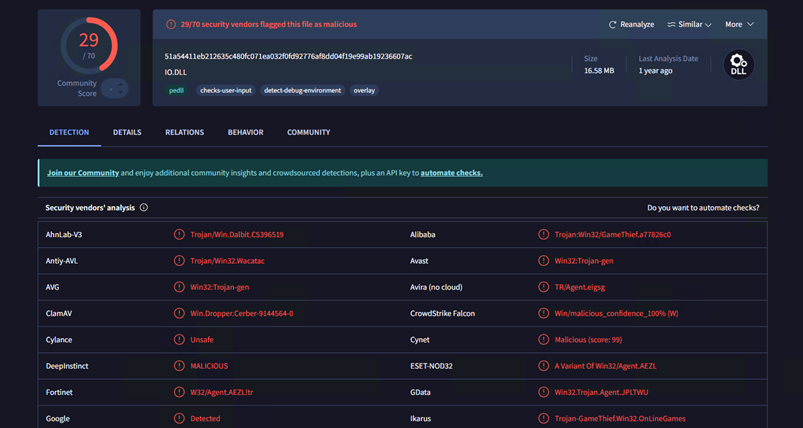
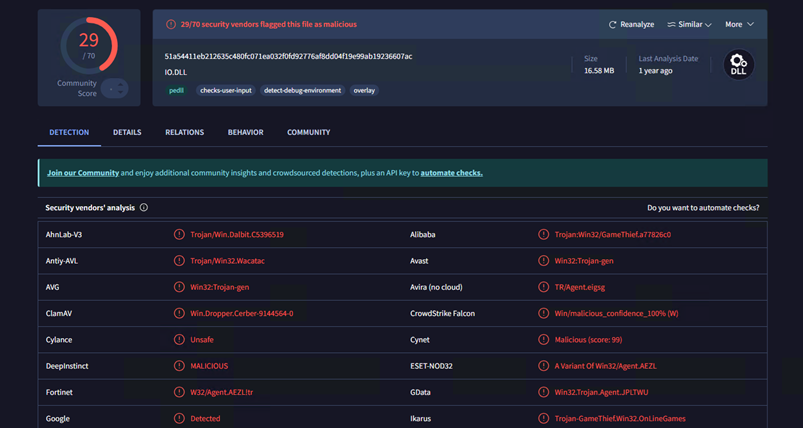
삭제 전 해당 파일 copy 후, 별도 분리된 환경(VM)으로 복사 및 virustotal 검색 시 하기와 같이 확인됨.